
fatcat apps
WooCommerce is the most popular shopping cart in the world. Pixel Cat lets you send WooCommerce shopping behavior, events, and conversions to Facebook. You’ll be able to set up Custom Audiences, track conversions, and even set up Dynamic Product Ads.
We’ve also added an Easy Digital downloads extension, so you can track events and conversion. The setup for these integrations is identical. Just turn them on, and decide if you need some extra details passed along.
Before you begin:
This feature Requires WooCommerce v3.0 or greater, or Easy Digital Downloads v2.8 or greater.
You can set up our Facebook Pixel – WooCommerce and EDD integrations with a single click.

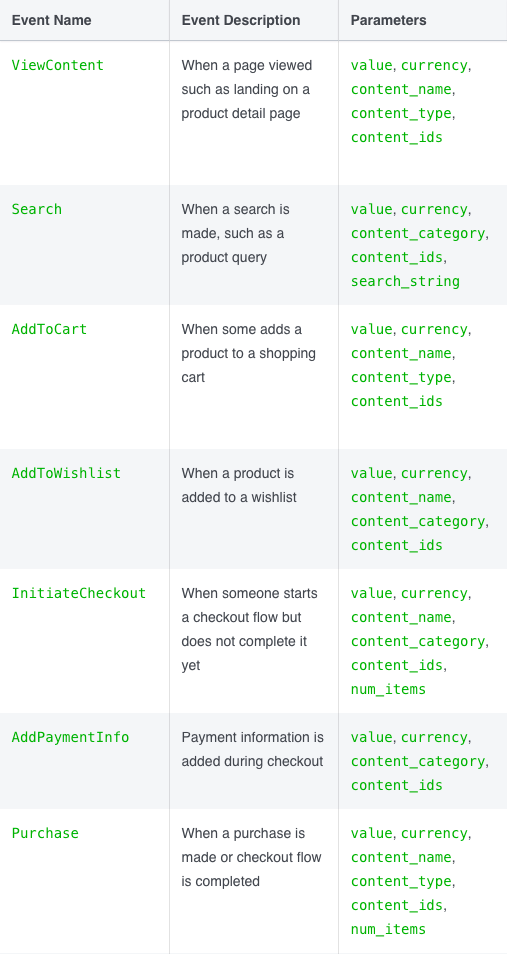
Once you turn on the Facebook Pixel for WooCommerce or EDD, Pixel Cat will automatically send the following Standard Events to Facebook.
Using these events, you’ll be able to retarget your visitors using Custom Audiences & Dynamic Product Ads.
Not only do we send Standard Events, but we also send all relevant parameters.
Based on which event is triggered, we send the following parameters:
value: the WooCommerce product pricecurrency: the currency of the value providedcontent_name: the product’s namecontent_type: product, or product_groupcontent_ids: the WordPress id, or WooCommerce SKU number of your products. (Changes based on your selection under Product Feed -> Advanced Settings -> Product Identifier)content_category: the WooCommerce product categorynum_items: the number of items in your cart when the “Initiate Checkout” event is triggeredTo learn which parameters will be sent for which events, please refer to this table.
Both our WooCommerce and EDD integrations have some additional parameters you can choose to enable.

Once enabled we will send your customers ‘lifetime value’, any coupon codes, and any shipping information provided at checkout, as extra parameters. This gives a lot more ability to create highly targeted custom audiences.