
December 2, 2020
Introducing Quiz Cat 2.0: Weighted Answers & Design Updates
Now is as good a time as ever to start using quizzes for your WordPress site! We’ve just released a big...

 June 13, 2016
In this post we’re introducing our new WooCommerce price table feature. Wanna build beautiful WooCommerce pricing tables that boost sales in minutes? Keep reading…
Did you know WooCommerce isn’t only the leading WordPress e-commerce plugin, but that it has a larger market share than any other e-commerce platform?
Not only that, WooCommerce is completely free and continuing to grow rapidly. While WooCommerce’s e-commerce market share was 19% in April 2015, it has grown to 30% in less than a year according to builtWith:
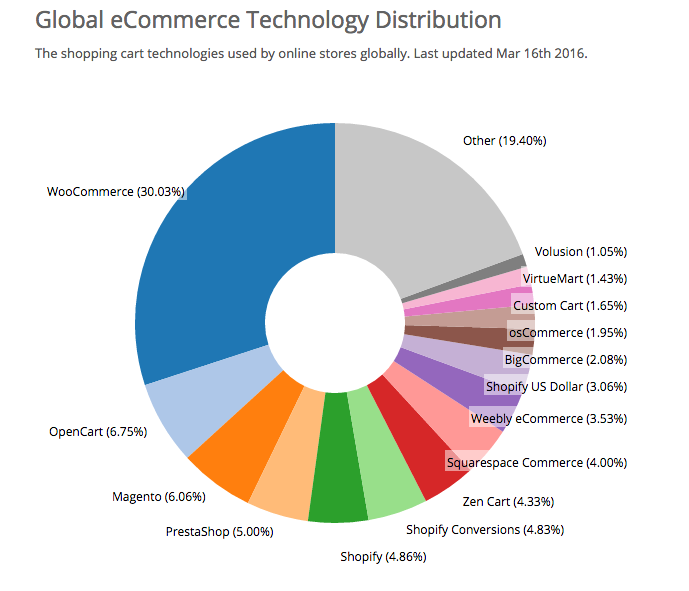
As the creators of Easy Pricing Tables, WordPress’ leading pricing table plugin with more than 200,000 downloads and thousands of paying customers, we’ve noticed an ever increasing number of people using our plugin to build WooCommerce pricing tables.
While building WooCommerce product price tables has always been possible with Easy Pricing Tables, things could have been easier. Previously, setting up a WooCommerce price matrix or table involved dealing with long & confusing “add to cart” URLs. Updating the price or name of a WooCommerce product involved going back to the product price table to manually change things.
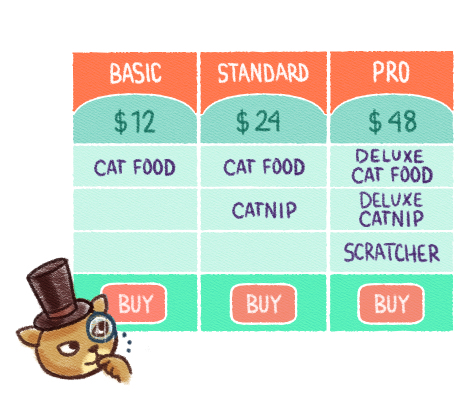
We aim to make our plugins as easy to use as possible, so we decided to create a better way to build a WooCommerce pricing table…
First, make sure both WooCommerce & Easy Pricing Tables are installed and activated.
Now create a new pricing table (or open an existing one) and click the WooCommerce button above your column. Click on your product or product variation.
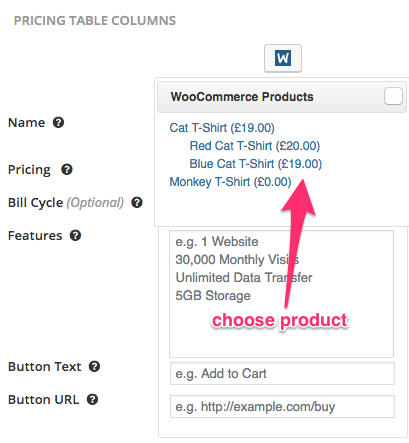
Voilà. You’ve just added your WooCommerce product name, price point and “add to cart link” to your new WooCommerce price matrix.
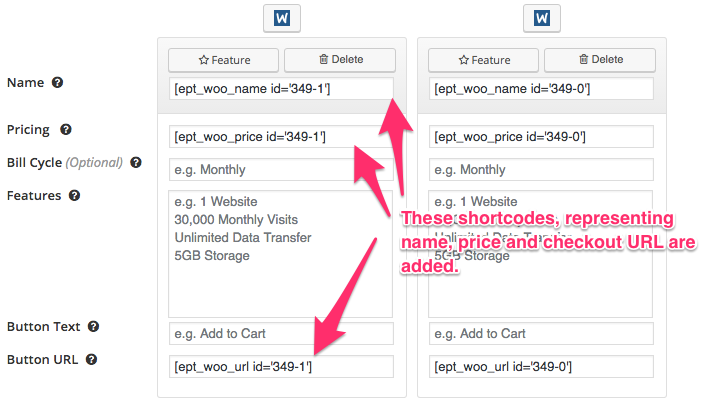
All that’s needed to complete your WooCommerce price grid is to add your product’s features and the button’s text (our recommendation: “Add To Cart”).
That’s it. Click “Save & Preview” and look at your shiny and new WooCommerce price matrix.
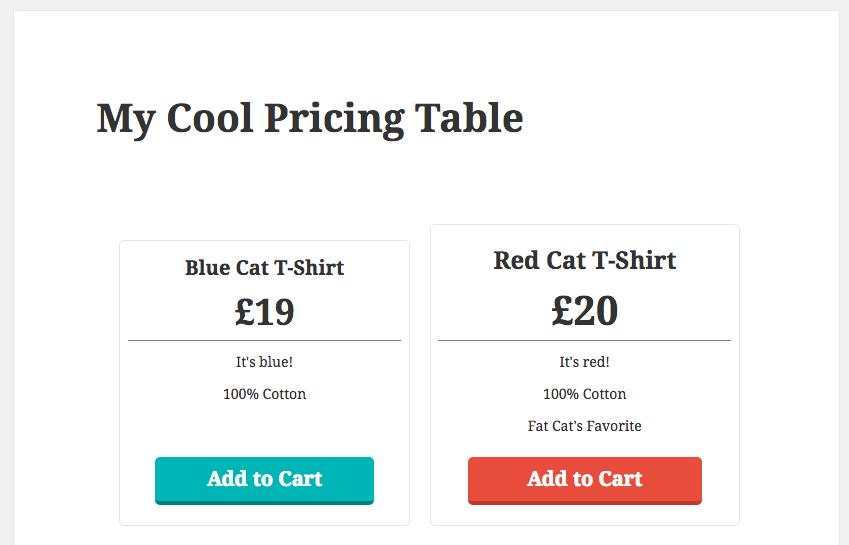
@video
No matter if you call them “WooCommerce price matrix”, “product price table” or “grid”, building these things has never been easier.
Building a product comparison table takes less than 5 minutes using Easy Pricing Tables.
Just imagine how much work it would be to build a beautiful WooCommerce pricing table that looks great on all devices by hand, even if you’re an experienced developer.
And we haven’t even mentioned our coolest feature yet… Whenever you change your product / product variation’s name or price, our WooCommerce pricing table updates automatically. This eliminates headaches, confusion and lost revenue.
Other than WooCommerce being the market-leading e-commerce platform, we love how powerful, flexible and and extensible WooCommerce is. Not to mention WooCommerce runs on WordPress, unquestionably the best CMS out there (chances are that this ain’t news to you if you’re reading this :]). If you’ve never used WooCommerce, I suggest you give it a try and download it here, it’s 100% free.
In Portland, OR, there’s a great food truck called Güero that makes Mexican tortas & rice bowls.
— Güero (@GueroPDX) February 23, 2016
3 types of rice bowls are on the menu:
While vegetarians will go for “Frida”, the $9.50 “Diego” is a no-brainer if you like meat. The $1.50 difference is completely negligible.
The $11 “Panzeon” on the flip side seems like less of a good deal. $1.50 for a fried egg seems pricey, right? Not so fast, these guys know what they’re doing. They are accomplishing two things:
The result is that Güero makes more money by having a $11 bowl, even if most people don’t buy it.
One of the biggest possible wins for any business is to create multiple price points per product. For an ecommerce shop, this might mean introducing different colors, sizes, materials or bundling products together.
We’ve talked about Mexican food, why WooCommerce is awesome and why our plugin is the best way to build a WooCommerce price table.
Remember – our WooCommerce pricing tables look great out of the box, are optimized for conversions, take less than 5 minutes to build and even update accordingly if you change your product’s price or name.
If you’d like to build a highly converting pricing table for WooCommerce, click here. All our products comes with a 60 day money back guarantee, so you’ve got nothing to lose =)
Click here to build WooCommerce pricing tables.
Are you an existing customer? This feature was shipped as part of Easy Pricing Tables Premium 2.3.0, requiring a Business or Agency license.
Questions, thoughts or suggestions? Leave a comment below.
December 2, 2020
Now is as good a time as ever to start using quizzes for your WordPress site! We’ve just released a big...

March 31, 2020
The latest update to Pixel Cat promises to give you more powerful options for Facebook retargeting. The updat...

December 11, 2018
WordPress 5.0 (including the much-publicized Gutenberg post editor) is here, and we’re happy to announce se...